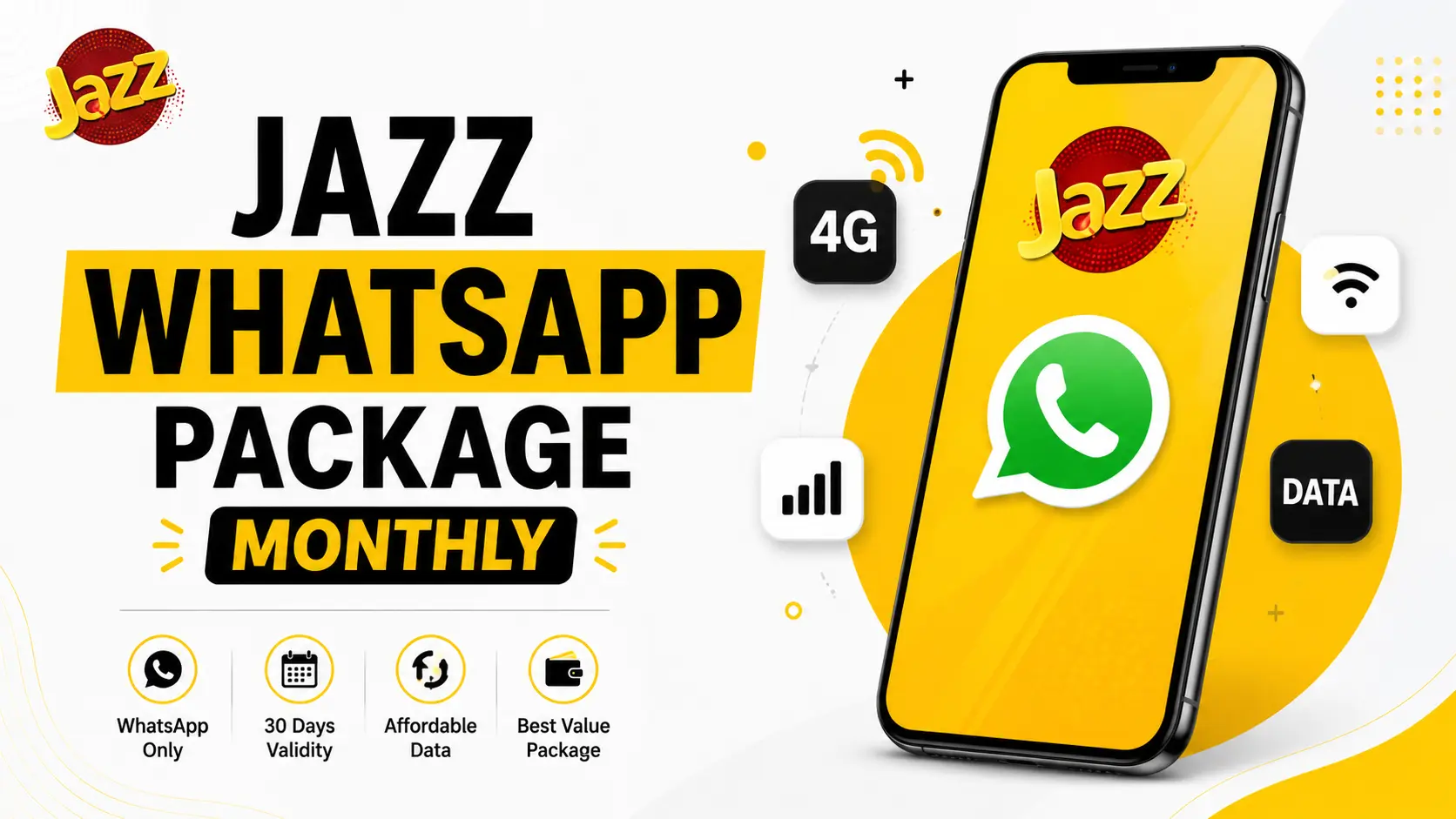
Jazz WhatsApp Package Monthly – Price, Code, and Everything You Need to Know (2026)
If most of your phone usage is WhatsApp—chatting, voice notes, and video calls with family—paying for a full internet bundle can feel like overkill. Jazz’s WhatsApp Package Monthly exists exactly for this situation: a lower-cost bundle built around messaging rather than general browsing.
This guide covers more than just the price and code. You’ll get a clear breakdown of what’s actually included, how it compares to Jazz’s other social and hybrid packages, whether it’s genuinely worth it for your usage, and the mistakes people commonly make when subscribing.
⚡ Quick Recommendation
Get this package if WhatsApp is genuinely most of your phone usage—it’s one of the cheapest well-rounded bundles Jazz offers for that specific habit. Skip it if you’re active on Instagram, TikTok, or YouTube too; the Monthly Social Package will serve you better for a bit more money. Full reasoning below.
Quick Summary
| Detail | Value |
|---|---|
| Data | 10 GB (WhatsApp) |
| On-Net Minutes | 300 |
| SMS | 1,000 |
| Validity | 30 Days |
| Price | Rs. 478 (Incl. Tax) |
| Subscription Code | *661# |
Jazz has, at different times, marketed similar WhatsApp-focused bundles under different codes and slightly different data scopes (some versions bundle in Facebook and IMO access alongside WhatsApp). Jazz packages and pricing change periodically, so always confirm the current price and code by dialing before subscribing or by checking the Jazz World (Simosa) app.
What’s Actually Included in This Package?
The core offer is 10 GB of data usable specifically within the WhatsApp app—text messages, voice notes, media sharing, and voice/video calls all draw from this allowance. Alongside the data, you get 300 on-net minutes for calling other Jazz numbers and 1,000 SMS valid across all networks.
This makes it a hybrid-lite package: not a pure data bundle and not a pure call package, but a focused combination aimed at users whose primary activity is messaging.
Step-by-Step: How to Subscribe
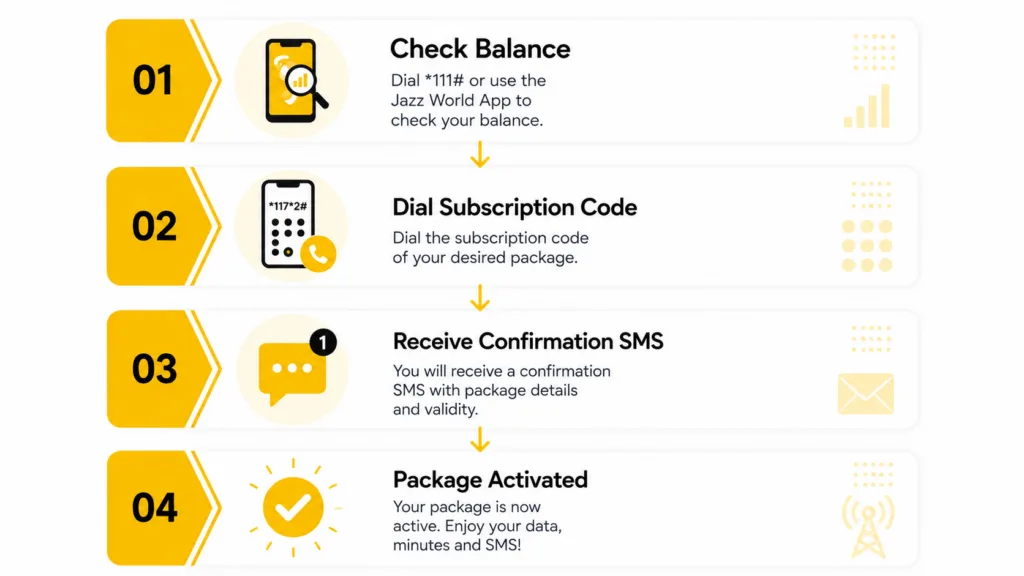
- Check your balance. Dial *111# and confirm you have at least Rs. 500 available — a small buffer above the package price avoids failed activation attempts.
- Dial the subscription code. Enter *661# from your Jazz number and follow the on-screen confirmation.
- Wait for the confirmation SMS. You should receive a message confirming activation within a minute.
- Check your remaining balance anytime through the Jazz World (Simosa) app, or by dialing the package’s status code.
- To unsubscribe, use the Jazz World app’s “My Subscriptions” section, or dial the general unsubscribe code *6611# to turn off all active offers.
Save the unsubscribe code (*6611#) somewhere you’ll actually remember it — like a phone note — the same day you activate. It takes ten seconds now and saves you a search later when you actually need to switch packages.
Pros & Cons
Pros
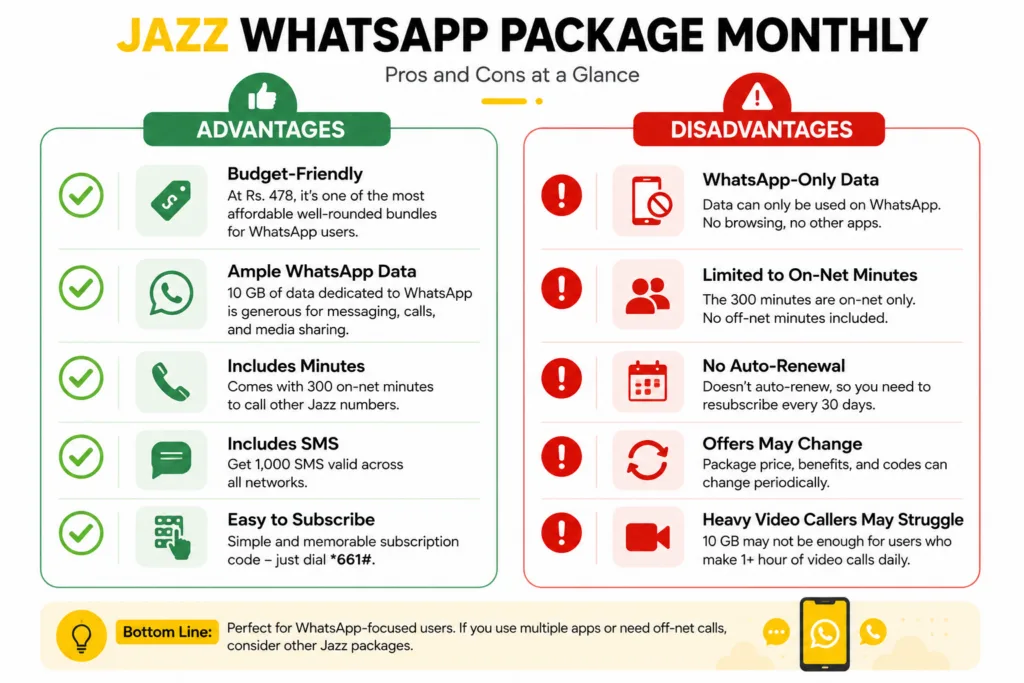
- Meaningfully cheaper than general hybrid packages for users whose main activity is WhatsApp
- Includes both calling minutes and SMS, not just data — genuinely well-rounded for messaging-first users
- 10 GB is generous for WhatsApp specifically, since text and voice notes use very little data
- Simple, memorable subscription code (*661#)
Cons
- Data cannot be used outside WhatsApp — no browsing, no other apps
- 300 on-net minutes won’t cover heavy calling to other networks (off-net minutes aren’t included)
- Doesn’t auto-renew, so it’s easy to forget and accidentally fall back to standard rates
- Package specifics have appeared inconsistently across different sources, making it worth double-checking before you subscribe
4/5 — for the specific use case it targets, one of the better-value packages Jazz offers. Falls to a weaker option quickly if your usage spreads beyond WhatsApp.
Expert Opinion
Single-app packages like this one are a pricing trick worth understanding: Jazz can offer a lower price precisely because it’s betting most subscribers will occasionally step outside the app boundary and get charged standard rates anyway. That’s not a knock against this package — it’s genuinely good value if you stay disciplined — but go in aware of how the economics work, not just the headline price.
Worried about unexpected charges from stepping outside the app? The Jazz Balance Save Code stops standard-rate deductions from touching your main balance — a useful safety net alongside any single-app package.
How Far Does 10 GB Actually Go on WhatsApp?
Numbers on a spec sheet don’t mean much without context, so here’s a realistic breakdown.
| Activity | Approx. Data Used |
|---|---|
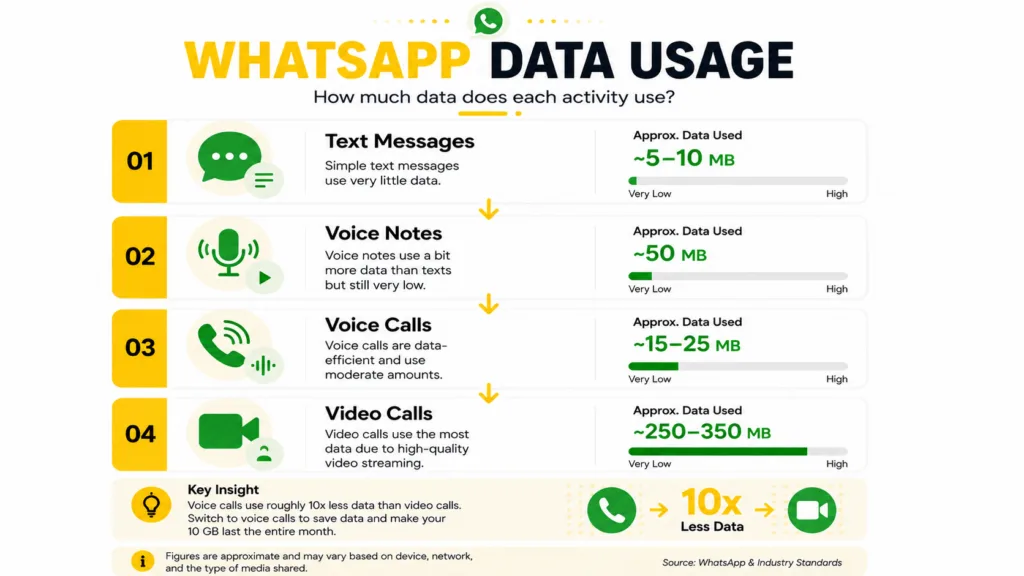
| Text messages (1,000 messages) | ~5–10 MB |
| Voice notes (100 x 1-minute notes) | ~50 MB |
| Voice call (1 hour) | ~15–25 MB |
| Video call (1 hour) | ~250–350 MB |
| Photo/video sharing (50 photos + 5 short videos) | ~150–300 MB |
At these rates, 10 GB comfortably supports daily texting, frequent voice notes, and several hours of voice calls monthly. The allowance tightens noticeably if video calling is a daily habit — a household making 1+ hour of WhatsApp video calls every day could realistically use 7–9 GB on video calls alone, leaving little room for anything else.
Jazz WhatsApp Package vs. Alternatives
If you’re not sure this is the right package, here’s how it stacks up against the closest alternatives.
| Feature | WhatsApp Package Monthly | Facebook Package Monthly | Monthly Social Package |
|---|---|---|---|
| Data | 10 GB (WhatsApp only) | 10 GB (Facebook only) | 10 GB (multi-app) |
| On-Net Minutes | 300 | 300 | 500 |
| SMS | 1,000 | 1,000 | 500 |
| Price | Rs. 478 | Rs. 478 | Rs. 800 |
| Best For | WhatsApp-first users | Facebook-first users | Users active on multiple apps |
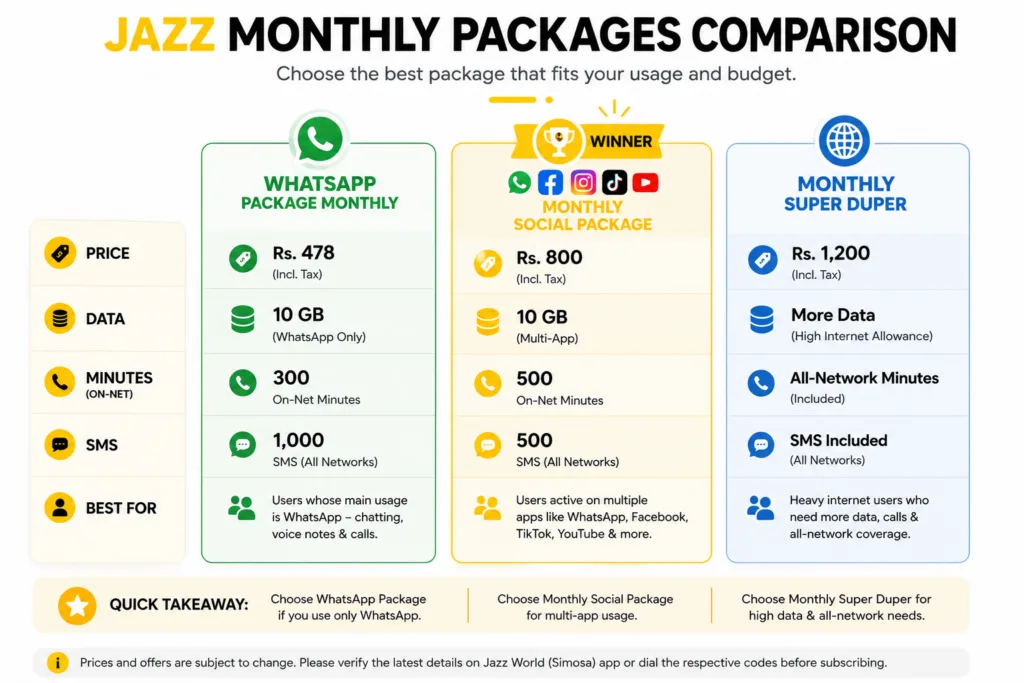
on a pure cost-per-GB basis, all three packages land close to Rs. 48–80 per GB, so price-per-GB alone doesn’t separate them — the real deciding factor is how many apps your 10 GB actually needs to cover, not how cheap each gigabyte looks on paper.
Who Should Get This Package (and Who Shouldn’t)
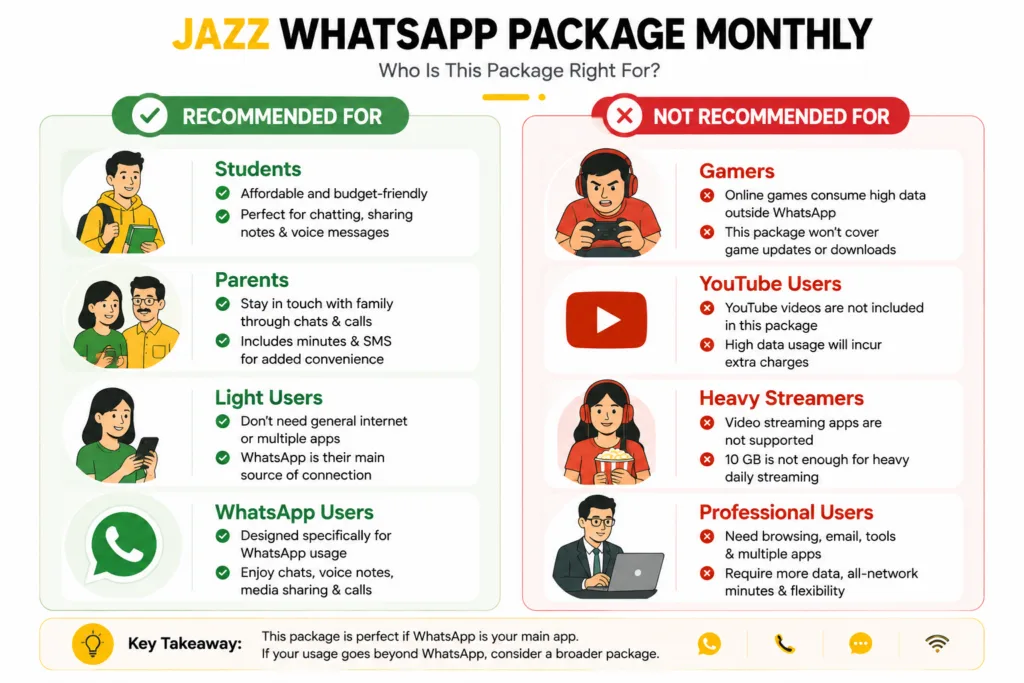
Should You Buy This Package?
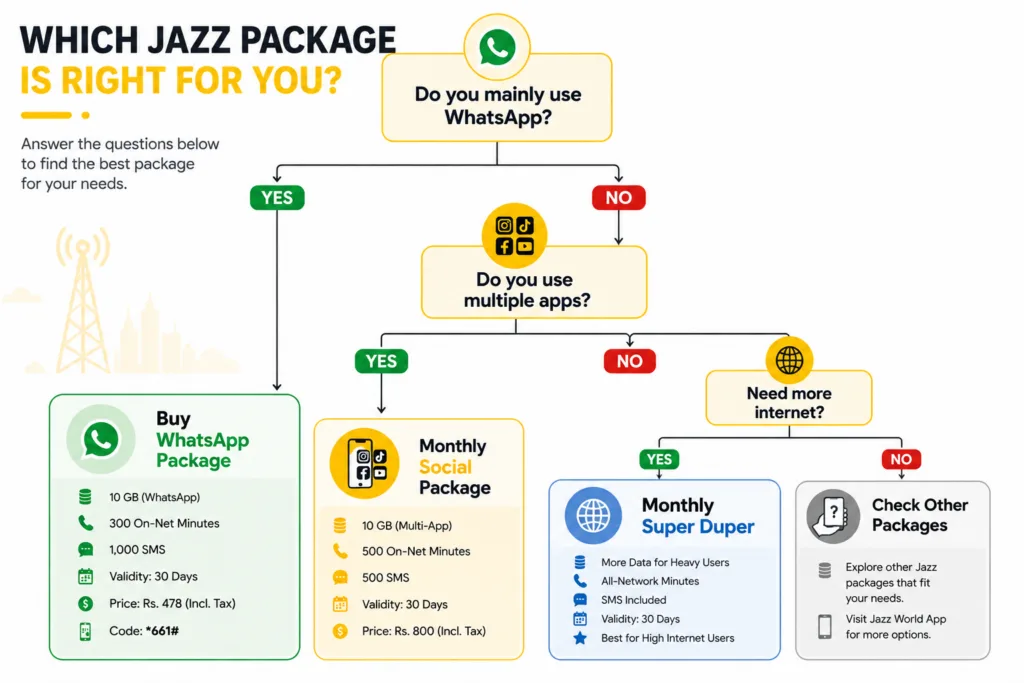
Expert Tips
Track your first month’s usage before assuming this package fits long-term. If you’re consistently using under 7 GB, you could likely drop to a smaller/cheaper WhatsApp-focused option. If you’re maxing out before day 25, move up to the Monthly Social Package next cycle.
Set a manual reminder to resubscribe, since this package doesn’t auto-renew — a missed renewal means falling back to Jazz’s standard pay-as-you-go data rate Rs. 5/MB, which adds up fast.
Switch to voice calls over video calls when data is running low late in the cycle — the data savings are substantial, as shown in the usage table above.
Don’t assume the SMS allowance carries over to non-WhatsApp use restrictions—the 1,000 SMS works across all networks, unlike the data, which is WhatsApp-locked.
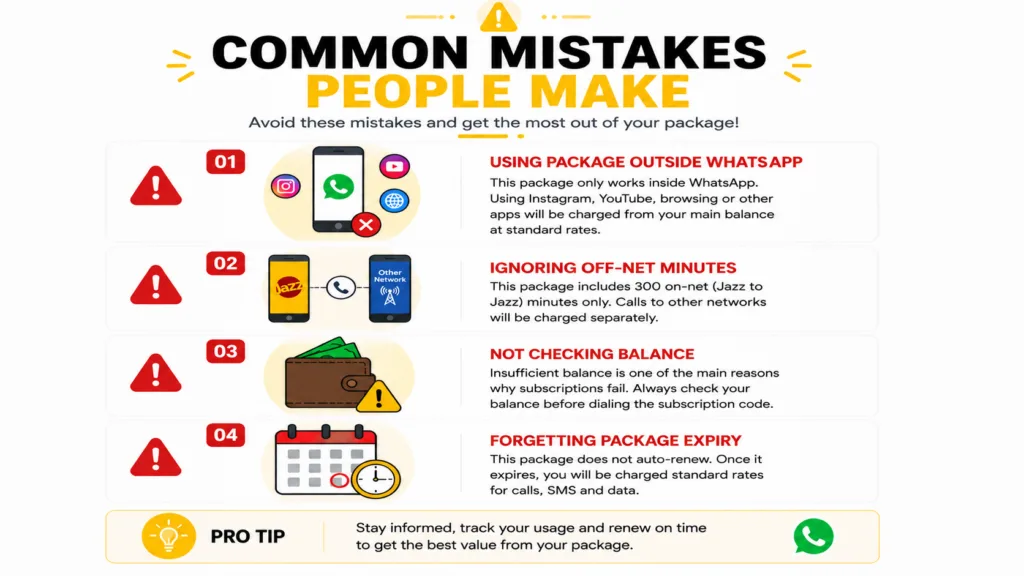
Common Mistakes to Avoid
Assuming the data works for any app. It doesn’t—attempting to use Instagram or browsing with this package active will pull from your regular balance at standard rates.
Subscribing without checking balance first. A failed activation attempt due to insufficient balance is one of the most common issues reported.
Forgetting it doesn’t auto-renew. Users often assume their package is still active weeks later and are surprised by standard-rate charges.
Not checking for updated codes or pricing. Jazz occasionally revises codes and prices; relying on an old blog post or screenshot can lead to a failed or mismatched subscription.
Ignoring the off-net minute gap. Because only on-net minutes are included, users who call other networks regularly get caught off guard by standard call charges.
Troubleshooting
Confirm your balance covers Rs. 478 plus a small buffer, then redial *661#. If it still fails, the offer may be temporarily unavailable — check the Jazz World app.
Jazz periodically updates activation codes. If *661# doesn’t respond, check the Jazz World (Simosa) app’s offers section for the current activation method.
This usually means video calling is consuming more of your allowance than expected—see the usage breakdown above, and consider switching to the Monthly Social Package if the pattern continues.
Wait a few minutes and check your balance via *111#. If the deduction went through without activation, contact the Jazz helpline at 111 for a refund request.
FAQs
What is the Jazz WhatsApp package monthly price?
What is the Jazz WhatsApp package code?
Can I use the WhatsApp package data for anything other than WhatsApp?
Does the Jazz WhatsApp package cover WhatsApp video calls?
How do I check remaining data on the WhatsApp package?
Does this package include off-net minutes?
Does the Jazz WhatsApp package auto-renew every month?
Is the Jazz WhatsApp package better than the Monthly Social Package?
What happens if I run out of WhatsApp data before the month ends?
Can I use this package on a postpaid Jazz connection?
Conclusion
The Jazz WhatsApp Package Monthly is a genuinely good fit for one specific type of user: someone whose phone life runs almost entirely through WhatsApp. At Rs. 478 for 10 GB of WhatsApp data plus 300 minutes and 1,000 SMS, it undercuts general packages meaningfully — but only if your usage stays inside that lane.
The moment your habits include Instagram, TikTok, YouTube, or regular calls to other networks, the math flips, and a broader package like Monthly Social Package becomes the smarter buy despite the higher sticker price. Use the usage breakdown and comparison table above to check where you actually fall before subscribing.
Final verdict
Narrow, WhatsApp-only usage → activate with confidence at *661#. Mixed app usage → check Jazz Monthly Social Package first. Either way, confirm the current price and code before dialing, since Jazz revises offers periodically.
Trust & Verification
Similar Posts
Jazz We 5 Package
Jazz We5 Package – Prices, Codes & Sharing Rules Explained (2026) Jazz We5 lets one person share data, minutes, and SMS with up to 4 family members through a single subscription. Four variants exist — We5 Fantastic, We5 Super, We5 Social, and We5 Gupshup — all activated via *400#, with prices ranging from Rs. 2,000…
Jazz Balance Save Code
Jazz Balance Save Code — Stop Automatic Balance Deduction ✅ Last Verified: September 2026 — Codes and pricing checked against Jazz’s official channels. Jazz updates its service codes periodically, so if a code below doesn’t respond, check the Jazz World (Simosa) app. If you’ve ever opened your phone and found your balance mysteriously gone —…
Jazz Sim Lagao Offer
Jazz SIM Lagao Offer – *551# Code, Data Split & Full Details (2026) The Jazz SIM Lagao Offer reactivates a dormant Jazz SIM (inactive 30+ days) with 3,000 minutes, 3,000 SMS, and 8 GB of data for 60 days, at a cost of Rs. 0.01. Dial *551# to activate. The data isn’t given all at…
Jazz Monthly Call Package in 100Rs
Jazz Monthly Call Package in 100 Rupees – *699# Explained (2026) The Jazz Monthly Call Package in 100 Rupees is accessed by dialing *699#. It’s officially called “Mera Package, Meri Superpower,” and it’s not one fixed package — it’s a personalized offer menu that shows different bundles to different users. The commonly reported version gives…